Readability Metrics
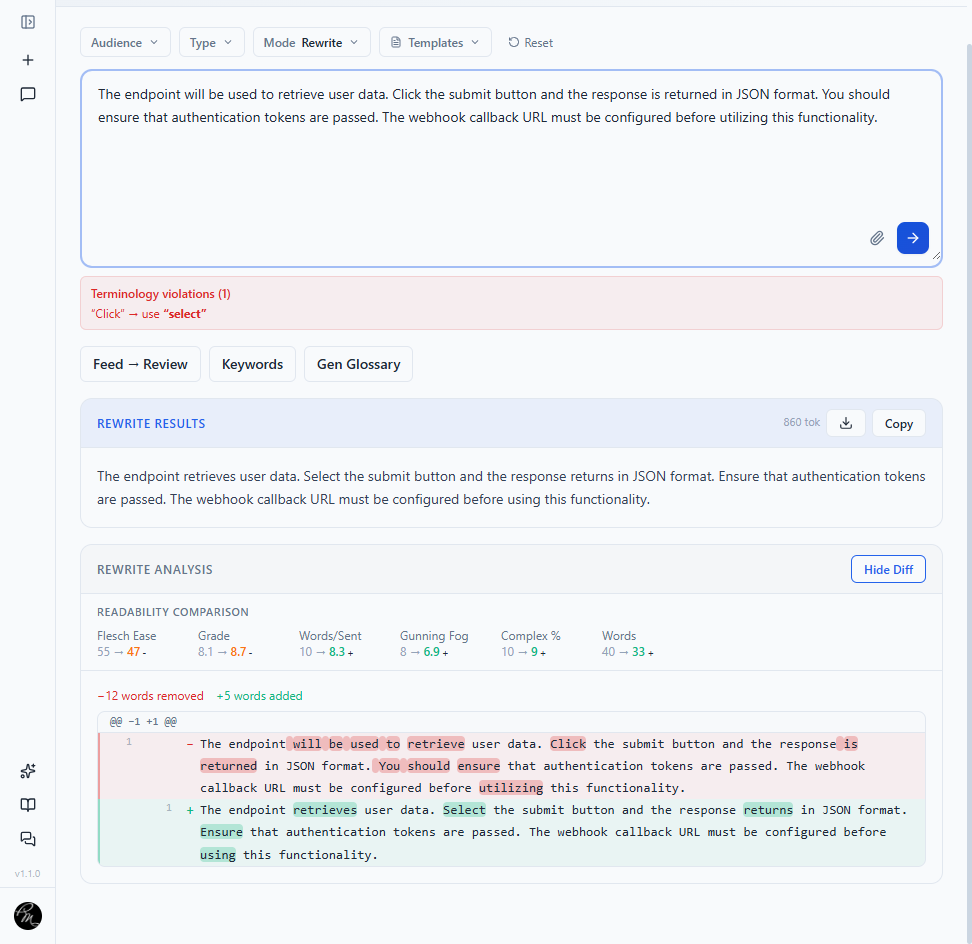
TechWrit AI calculates readability scores in real time as you type. The scores appear in the Readability panel below the content input. In Rewrite and Simplify modes, the output panel adds a before-and-after comparison so you can see the concrete impact of edits. See Modes for details on these modes.

Scores
Flesch Reading Ease (0–100)
Measures how easy text is to read — the higher the score, the easier the text.
| Score | Level |
|---|---|
| 80–100 | Easy — conversational, accessible to wide audiences. |
| 60–79 | Standard — comfortable for most readers. |
| 40–59 | Difficult — might require domain expertise. |
| 0–39 | Very difficult — academic or highly specialized. |
Flesch-Kincaid Grade Level
Estimates the United States (US) school grade required to understand the text. A score of 8 means an eighth-grade reader can understand the text.
Target for technical docs: Grade 8–12 depending on audience. Set the target in Settings → General → Reading Level: General (Grade 6–8), Standard (Grade 8–10), or Advanced (Grade 10–12). The setting persists and applies to generated and rewritten output.
Gunning Fog Index
Estimates years of formal education needed. Similar to grade level but weights complex words (three or more syllables) more heavily.
Calculation notes
TechWrit AI uses standard formulas for each metric:
- Flesch Reading Ease and Flesch-Kincaid Grade Level use the original Flesch formulas based on average sentence length and average syllables per word.
- Gunning Fog Index uses the Robert Gunning formula, weighting words of three or more syllables. [VERIFY]
Additional metrics
| Metric | What it measures | Better direction |
|---|---|---|
| Word count | Total words in the input. | Context-dependent. |
| Words per sentence | Average sentence length. | Lower (clearer). |
| Complexity % | Percentage of words with three or more syllables. | Lower (simpler vocabulary). |
Before-and-after comparison
In Rewrite and Simplify modes, the output panel shows a side-by-side comparison of these metrics:
| Metric | Better direction |
|---|---|
| Flesch Reading Ease | Higher. |
| Flesch-Kincaid Grade Level | Lower. |
| Words per sentence | Lower. |
| Complexity % | Lower. |
| Total word count | Context-dependent. |
TechWrit AI highlights improvements in green and regressions in orange. Any change in the better direction appears in green; any change in the worse direction appears in orange. Unchanged metrics keep default text. [VERIFY: confirm threshold]

Word-level diff
Select the Diff toggle in the output panel to see exactly what changed:
- Red strikethrough — Removed words.
- Green highlight — Added words.
- Normal text — Unchanged words.
The summary line displays the total count of removed and added words.
Recommended targets
Use these targets as a starting point for most technical documentation: [VERIFY: confirm against product defaults]
| Audience | Flesch Reading Ease | Grade Level | Complexity % |
|---|---|---|---|
| Consumer-facing | 60+ | Grade 6–8 | Under 15% |
| Developers and engineers | 40+ | Grade 8–10 | Under 25% |
| Specialists and researchers | 30+ | Grade 10–12 | Under 35% |
These targets match the General, Standard, and Advanced options in Settings → General → Reading Level.